
[ROLE]
Content & Web Developer
[TIMELINE]
1 year
[TEAM]
Individual
[CONTEXT]
USDA Northeast Climate Hub × Cornell Climate Smart Farming
[CROSS-DISCIPLINARY WORK - DIGITAL DESIGN]
ADAPTATION GUIDE
UX/UI Design, Information Architecture, User Research, Web Development
[PROJECT OVERVIEW]: I designed and developed a web-based climate adaptation guide for the USDA Northeast Climate Hub, translating research and stakeholder needs into an accessible resource that helps farmers and foresters navigate climate adaptation strategies
PROBLEM
-
Climate adaptation resources were only available as static PDF guides.
-
Long documents made information difficult to navigate and search.
-
Resources quickly became outdated as recommendations and tools evolved.
-
Users had to manually locate information across fragmented resources.
-
Farmers and advisors needed timely, region-specific guidance that was easier to access.
-
Existing climate adaptation workbooks were limited to static formats, with no interactive digital version available.

While helping to write and design the Northeast Climate Adaptation Workbook, I identified a usability gap in the existing PDF format and proposed developing the first interactive, web-based Climate Adaptation Workbook for Northeast farmers.
Where adaptation workbooks were failing...
RESEARCH
METHODS
[LITERATURE REVIEW]
60+ Peer reviewed papers
[FARMER FOCUS GROUP]
8 Northeast Farmers
[ADVISOR FOCUS GROUP]
13 Agricultural Advisors
FINDINGS
Information is hard to find
Users need simplicity
Trust and acessibility drive adoption
Needs very by operations and location
Advisors are key to farmer adoption
DESIGN GOALS
Familiar book-like navigation
Clear information architecture
Simple clear accessible
Flexible and relevant content
Complements existing Extension resources
KEY TAKEAWAY
Farmers need a simple, trustworthy, and easy-to-navigate online guide to access climate adaptation resources
IDEATION

I translated our research findings into low-fidelity wireframes, exploring how a familiar, workbook-like structure could make the guide easier to navigate while introducing interactive features that weren’t possible in the original PDF.
[Consistent Structure]
Organized content into replicable modules with consistent navigation.
[Scannable Content]
Broke dense information into smaller, predictable sections.
[Interactive Worksheets]
Explored ways for users to complete and save activities directly within the guide.
VISUAL DESIGN
[VISUAL IDENTITY]
A clean nature inspired identity that reflects the Northeast landscape and aligns with Cornell Climate Smart Farming's established visual language
PARTNER BRANDING
ADAPTED IDENTITY
TYPOGRAPHY


#74A24D
#FCBE3B
#D9D9D9
#62A5CF
#012B1B
Aa
Heading
Playfair Display Bold
Aa
Body
Arial
Typography carries over from the original PDF workbook, creating visual continuity between the print and digital experiences.
[AUTHENTIC + APPROACHABLE]
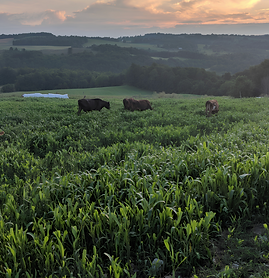
Rather than relying on generic agricultural imagery, I incorporated photographs from participating Northeast farms to create an experience that feels recognizable and connected to the guide’s intended users.



[CONSISTENT DESIGN SYSTEM]
A repeatable system of layouts and components creates a predictable experience across every module and worksheet, prioritizing simplicity in user navigation


Consistent instruction banners and editable fields guide users through each worksheet with a clear, repeatable structure.

Each module follows the same content structure and visual hierarchy, creating a predictable experience throughout the guide.

Placed at the end of each section, a consistent “Continue” button guides users step by step through the workbook.
INTERACTIVE EXPERIENCE

[GUIDED NAVIGATION]
A table-of-contents style hamburger menu mirrors the structure of a familiar workbook, guiding users through information modules and worksheets step by step.
[EDITABLE WORKSHEETS]
Editable worksheets bring the workbook directly into the digital experience, allowing users to complete activities without switching between the website and a separate document.
ORIGINAL PDF

Static worksheet designed for print or manual completion.
DIGITAL ADAPTATION

Editable fields allow users to complete activities directly within the guide.
[SAVE & RETURN]
Login-based worksheets allow users to save progress, revisit previous answers, and update their adaptation plans over time, turning the guide from a static resource into an ongoing planning tool.

User Log-In


Complete Worksheet
Save to User Account
RESULTS


REFLECTION
This project taught me how to identify usability gaps and translate complex research into an accessible digital product. Working with real stakeholders strengthened my ability to balance user needs, technical constraints, and existing content while designing a system people are actively using and maintaing